The short version
- Most AI tools only cover one of the three. Email assistants write drafts for you to send, chat widgets answer your website, and AI receptionists answer the phone. Few handle emails, form leads and website chat together.
- HighLevel is the lowest-cost platform that answers all three on its own, from one inbox. Podium and Hatch do it too, by quote and with heavier contracts.
- If you already run Workiz, Housecall Pro or Jobber, check what its AI covers first. If you mostly need help with your own inbox, an email assistant like Fyxer or Inbox Zero is the simple start.
- Builders and remodelers get the best results from a reply that asks your qualifying questions and lands in front of a person, not one that tries to book or price the job.
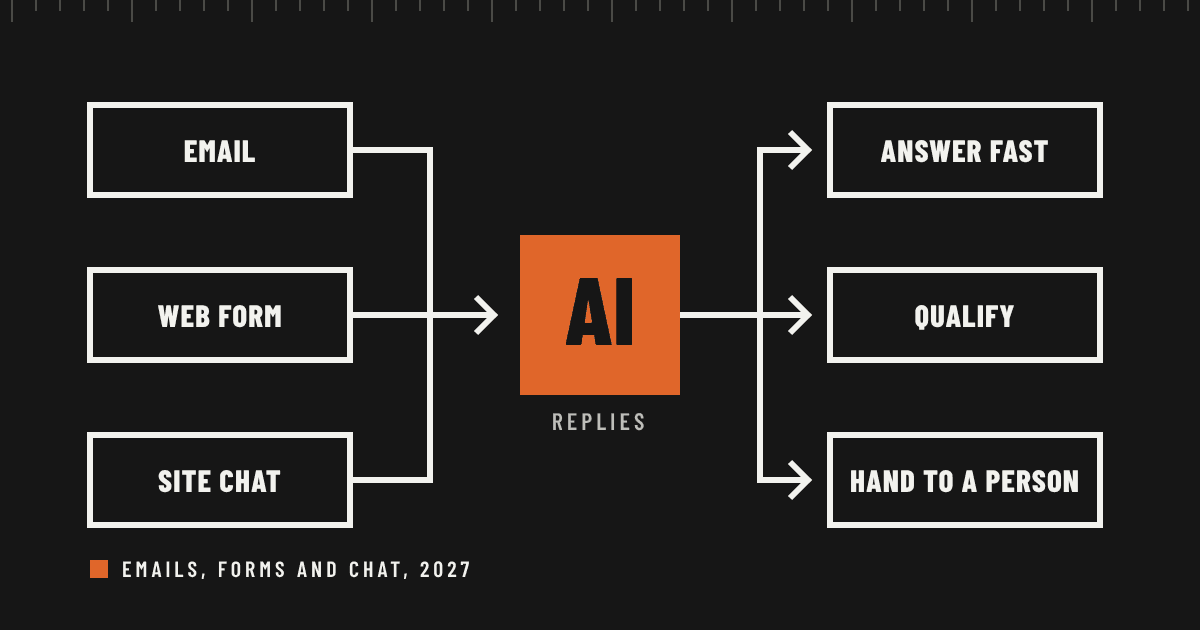
The phone isn’t the only way leads arrive. A homeowner fills in your contact form at 10 at night. A general contractor emails a bid invite. Someone opens the chat bubble on your site, asks if you work in their town and waits. Whoever answers first usually gets the next conversation.
In our guide to AI for missed calls, we covered the phone. This one covers everything that comes in as writing: emails, website forms and chat. The tools fall into five groups:
- One inbox for every channel: HighLevel, Podium and Hatch, where one AI agent answers email, forms, chat and texts.
- Built into field service software: Workiz, Housecall Pro and Jobber, each covering some of these channels.
- Email assistants: Fyxer, Superhuman, Inbox Zero, and the AI already in Gmail and Outlook.
- Website chat widgets: Tidio, Chatbase and Botpress.
- Build your own: your website form and inbox connected to an AI model through an automation tool like n8n or Zapier.
How we judged them
We looked at each one across the things that decide whether it works for a contractor:
- Channels: which of email, forms and website chat it actually answers.
- Drafts or sends: whether the AI replies on its own or writes a draft for you to send. This is the biggest difference between products, and it decides how fast the customer hears back.
- Ease of setup: what you have to connect and how long it takes.
- Cost: the published price and what it’s metered on.
- Integrations: whether the lead lands where your team already works.
Prices and features were checked November 17, 2026, from the vendors’ pages and help centers. Where a vendor doesn’t publish a price, we say so, and where a figure comes from a review rather than the vendor, we say that too. One note on where we stand: setting up AI intake is one of our services, so we have a point of view. Sources are linked at the end.
Want this working in your company? Book an AI discovery and we’ll show you where AI fits your office first.
The scorecard
| Tool | Forms | Website chat | Price | |
|---|---|---|---|---|
| HighLevel | Replies on its own | Yes, its own forms | Yes | From $97 a month, plus $50 or $97 for the AI |
| Podium | Yes | Yes, its own contact forms | Yes | By quote |
| Hatch | Yes | Yes, plus lead sites | Yes | By quote, annual plan |
| Workiz Genius Answering | Replies by text | Not stated | Not stated | Not published |
| Housecall Pro CSR AI | Not listed | Not listed | Yes | Not listed on its feature page |
| Fyxer | Drafts for you | No | No | From $37 a user a month, billed yearly |
| Inbox Zero | Drafts, or sends by rule | No | No | From $20 a user a month, billed yearly |
| Gemini in Gmail | Drafts for you | No | No | Included with Google Workspace |
| Tidio Lyro | No | No | Yes | From $39 a month for 50 conversations |
| Build your own | Your choice | Yes, your current forms | Optional | Automation plan plus AI usage |
One inbox for every channel
These platforms pull email, form leads, website chat and texts into one shared inbox, and one AI agent answers all of them. They cost more and take more setup than a single-channel tool, but they’re the only products here that cover all three channels without stitching tools together.
HighLevel
Best for: small shops and builders who want everything in one system at a low monthly price, and are willing to set it up or have someone do it.
- Channels: email, SMS, Facebook, Instagram, WhatsApp and website chat, chosen per agent. Email replies were added in March 2026. HighLevel’s own forms and chat widget feed the same inbox.
- Drafts or sends: sends. Once the email channel is on, the AI reads the thread and the contact record, writes a reply and sends it from your connected inbox, in the same thread.
- Cost: the platform is $97 a month on Starter or $297 on Unlimited. The AI Employee is $50 a month for 1,000 AI replies or $97 for unlimited use, or you pay by usage.
- Setup: the most of anything here. You connect your domain and inbox, build the forms and widget, and write the instructions the AI follows. Many shops have a marketing agency run it.
- Integrations: a native JobTread integration, plus many others through its marketplace and Zapier.
- Stand-out: the lowest-cost way to have one AI agent answer every written channel, plus missed-call text-back and voice AI in the same system.
- Watch for: it’s built for marketing agencies, so the menus are crowded, and the AI is only as good as the instructions and business details you give it.
Podium
Best for: service shops that want a polished, managed product and don’t mind a sales process.
- Channels: Podium says its AI Employee works across calls, text, email, social messages and website chat, from one inbox. Podium also sells website contact forms.
- Drafts or sends: sends, and it can keep a chat going by text after the visitor leaves your site.
- Cost: by quote. The AI Employee is an add-on to a base plan. One competitor’s review puts the base plan around $399 a month and the AI add-on at $99 to $399, but Podium doesn’t publish either.
- Setup: a guided rollout. Expect a few weeks to write your answers, connect your calendar and test it.
- Integrations: books directly into ServiceTitan and Housecall Pro for eligible businesses.
- Stand-out: calls, chat, texts and reviews in one place, with the AI and your staff working in the same conversation.
- Watch for: reviewers often mention contract and cancellation terms. Get the first-year total and the exit terms in writing.
Hatch
Best for: roofing, remodeling and replacement sales teams buying leads from Angi, Thumbtack, Google and Yelp.
- Channels: voice, text, email and a website chat widget, plus 23 lead sources it connects to directly.
- Drafts or sends: sends, following step-by-step journeys you set, and hands off to a person on request or when a conversation gets complicated.
- Cost: by quote, a platform fee plus usage on an annual plan. One independent review says shops report about $700 to $1,500 a month plus usage.
- Setup: weeks, with Hatch’s staff building the workflows on weekly calls.
- Integrations: ServiceTitan is the deepest, and it also connects to AccuLynx, JobNimbus, Leap, LeadPerfection and improveit 360. Housecall Pro needs Zapier.
- Stand-out: it chases leads from the big lead sites as fast as it answers your own.
- Watch for: it’s priced and staffed for shops running 20 or more appointments a week.
Already on field service software? Check it first
The field service platforms started with the phone. Their written channels are uneven, so check exactly what yours answers before buying something else.
- Workiz Genius Answering: replies to incoming texts and emails, asks qualifying questions and adds jobs to your schedule. It answers emails by text, using a phone number it finds in the message. You can set a delay so your team gets the first chance to reply, and add follow-ups if the customer goes quiet. Workiz doesn’t publish the price.
- Housecall Pro CSR AI: answers calls and website chats and books jobs from your schedule. Text answering is still listed as alpha, and email isn’t listed. Housecall Pro doesn’t list a price on the feature page.
- Jobber Receptionist: answers calls and texts on your Jobber number for $29 a month with 30 conversations, then 79 cents each, or unlimited on the Plus plan. It doesn’t answer email.
Email assistants: help with your own inbox
These sit on top of Gmail or Outlook and learn how you write. Almost all of them draft and wait for you, so they speed up your replies without sending anything on your behalf. That suits a builder whose email is mostly with clients, subs and suppliers, where a wrong automatic reply costs more than a slow one.
Fyxer
Best for: owners and office managers who live in their inbox. Fyxer sorts incoming mail into categories and writes reply drafts in your voice, ready for you to edit and send. Pro is $37 a user a month billed yearly or $49 monthly, and Team, which covers shared inboxes, is $64 billed yearly or $99 monthly. The free plan doesn’t write drafts. It works with Gmail and Outlook.
Inbox Zero
Best for: owners who want to choose, email by email, what the AI is allowed to send. You write plain-English rules, such as “reply to new quote requests with our service area and booking link,” and set each rule to run automatically or to wait for your approval. It drafts in your voice on every paid plan, which start at $20 a user a month billed yearly, and it can be self-hosted free. One limit: its automation doesn’t yet run on emails inside an existing thread.
Superhuman, Gemini and Copilot
Superhuman is a fast email app that drafts in your voice, from $25 a user a month billed yearly. If you already pay for Google Workspace, Gemini in Gmail writes replies in your tone from a short prompt, but as Google puts it, Gemini drafts and you press Send. Copilot does the same inside Outlook as a Microsoft 365 add-on. They’re worth turning on before you buy anything, but neither replies on its own.
Website chat widgets
If most of your leads start on your website, a chat widget trained on your services can answer at any hour and collect the visitor’s details.
- Tidio with Lyro: the simplest to start. Lyro is priced on its own, from $39 a month for 50 conversations up to $700 for 1,000, and you’re billed for each conversation it replies to. A conversation it hands straight to a person is free.
- Chatbase and Botpress: build-your-own chatbots for owners who want more control. Chatbase starts at $32 a month billed yearly. Botpress has a free plan with 100 conversations a month.
A chat widget only covers chat. Your form leads and emails still need an answer.
Build your own: your forms, your inbox, your AI
You can connect the forms and inbox you already have to an AI model with an automation tool. The reply comes from your own email address, uses your own words, and goes wherever you want it logged. A typical setup looks like this:
- Trigger: a new website form submission, which most form builders, including Elementor on WordPress, can send to an automation through a webhook. A new email in Gmail or Outlook can be a second trigger.
- Write: an AI model such as Claude or ChatGPT writes the reply from your instructions: your services, service area, typical price ranges, booking link and the questions you always ask.
- Send or draft: the automation sends from your inbox with your signature, or saves a draft for you to approve.
- Log and alert: it adds the lead to your CRM or job software and texts or messages you a one-line summary.
n8n publishes a ready-made workflow that does exactly this with a HubSpot form, Claude, Gmail and Slack, sending a reply within seconds of a form submission. Zapier and Make can do the same. The running cost is an automation plan plus a few cents of AI usage per reply.
Best for: builders who want replies in their own voice from their own address without moving to a new platform. Watch for: someone has to build and maintain it, and the AI only knows what you write into its instructions.
Builders and remodelers
A custom builder or remodeler gets fewer leads than a plumber, and each one is worth far more. The written reply shouldn’t try to book a job or quote a price. It should thank them quickly, ask the questions that tell you whether the project fits, and get a person involved.
A good first reply asks for:
- The project type, such as a kitchen, addition or new home.
- The address or town, so you can check your service area.
- A budget range and the timeline they have in mind.
- Whether they have plans or drawings yet.
- The best time for a call.
For most builders, the right setup is an automatic reply to form leads and chat, where speed matters and the questions are the same every time, and AI drafts for email, where you’re often writing to clients and subs mid-project. If you run JobTread, HighLevel’s native integration covers forms, chat and email in one system. If not, a build-your-own setup can file each lead where your team already works.
This is the work we do in an AI integration: replies in your voice that ask your questions and put the lead in front of the right person.
Should the AI send, or draft?
It depends on who’s writing in and what a wrong answer costs.
- Let it send: first replies to new form leads and chat visitors, after-hours acknowledgements, and answers to the same five questions you get every week.
- Keep it as a draft: anything about price, schedule changes, warranty claims, complaints, or a project already underway.
- Never let it promise: a price, a start date or a scope. Write that limit into its instructions in plain words.
Most shops start with drafts for a couple of weeks, read what the AI would have sent, fix its instructions, then switch the safe cases to automatic.
How to choose for 2027
- You mostly need help keeping up with your own email: Fyxer or Inbox Zero, or Gemini or Copilot if you already pay for them.
- Most of your leads come through your website: a chat widget like Tidio, plus an automatic reply to your form.
- You want every channel answered from one place at a low price: HighLevel.
- You want a managed product and have the budget: Podium.
- You buy leads and run a sales team: Hatch.
- You’re on Workiz, Housecall Pro or Jobber: its built-in AI for what it covers, then fill the gaps.
- Builder or remodeler: automatic replies that qualify form and chat leads, and AI drafts for client email.
Whatever you pick:
- Test it as a customer. Fill in your own form, email a vague question and open your own chat at midnight.
- Give it real facts. Service area, services you don’t offer, how quotes work and who to contact. Vague instructions get vague replies.
- Set the handoff. Decide which messages go to a person and how fast you’ll answer them.
- Check where the lead lands. A great reply to a lead nobody follows up is still a lost job.
Questions
Will the AI make up prices or promise things we can’t do?
It can, if you let it. Every tool here follows the instructions and business details you give it, so tell it plainly what it may and may not say, and keep anything about price, dates or scope as a draft for a person. Then read its replies for the first couple of weeks.
Will customers know they’re talking to AI?
A well-set-up reply reads like a quick, helpful note from your office. You can still say so plainly, with a line such as “our assistant” in the chat window or email signature. It’s honest, and it sets the expectation that a person will follow up.
Can it reply from my own email address?
Yes, with most of these. HighLevel sends from the inbox you connect, the email assistants work inside your own Gmail or Outlook, and a build-your-own setup sends through your account with your signature. Workiz is the exception: it answers an email with a text.
How fast should we reply to a new lead?
As fast as you can. A homeowner filling in forms often contacts several companies at once, and the first useful reply usually starts the conversation. An automatic first reply within minutes, followed by a call from a person the same day, is a good standard.
Does this replace the person in our office?
No. It covers the nights, weekends and busy hours when nobody can answer, and it handles the repeat questions. Your office still owns the conversations that need judgment.
Sources
- HighLevel: Inbound email support in Conversation AI
- HighLevel: One AI agent across channels
- HighLevel: AI products pricing
- BotPenguin: HighLevel plan and AI pricing
- JobTread: Integrations
- Podium: AI Employee
- Podium: Website contact forms
- Apex Blue: Podium AI review
- LeadResponse: Speed-to-lead software compared
- Hatch: Pricing
- ContractorToolStack: Hatch review
- Workiz: Using Genius Answering to reply to new messages and leads
- Housecall Pro: CSR AI
- Jobber: Receptionist, powered by Jobber AI
- Carly: Fyxer pricing
- Inbox Zero: Pricing
- Inbox Zero: AI automation rules
- Inbox Zero: AI email assistants compared
- Lead with AI: Gemini in Gmail
- CostBench: Tidio and Lyro pricing
- Sagnik Bhattacharya: AI customer service tools for the trades
- n8n: Reply to form leads with Claude, Gmail and Slack